Import guide
Import a Google Sheets workout plan into IronFlow
Bring your existing spreadsheet into IronFlow, keep the structure, and log workouts on mobile without rebuilding the plan.
Best for
Lifters already running a Google Sheets training plan
Works with
Sheet tabs, multi-week blocks, and structured strength templates
Outcome
A plan you can edit on desktop and log in the gym
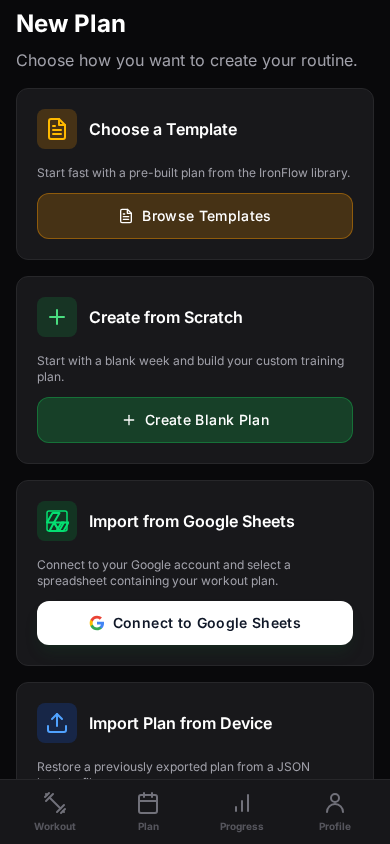
How to import from Google Sheets
Step 1
Connect Google Sheets once
Authorize your Google account, choose the spreadsheet, and pick the tab that contains your active training block.
Step 2
Pull the plan into IronFlow
IronFlow reads the sheet structure, converts it into a workout plan, and keeps the week and day layout intact.
Step 3
Train in-app and keep momentum
Start logging sets on mobile, review the full plan on desktop, and export again later if you need to share the plan.
Why this page matters
This is the highest-intent workflow for spreadsheet lifters
No rebuild required
The value proposition is immediate: take the plan you already trust and move it into a better logging workflow.
Clean mobile follow-through
Once imported, the spreadsheet stops being the thing you tap through during training. The phone app becomes the execution layer.
Strong search intent
People searching for Google Sheets workout imports usually have an existing plan and a reason to switch now, not someday.
Google Sheets import FAQ
More import paths
Explore the other import guides
Import guide
Turn your workout spreadsheet into a training app workflow
Use IronFlow to turn a workout spreadsheet into a structured training app workflow with mobile logging, desktop planning, and clearer progression tracking.
Import guide
Turn a workout plan photo into a structured plan
Capture a workout plan from a photo and turn it into a structured IronFlow plan you can log on mobile and manage on desktop.