Import guide
Turn your workout spreadsheet into a training app workflow
If your current plan lives in a spreadsheet, IronFlow gives you a cleaner way to follow it, update it, and log every session.
Best for
Lifters who plan in spreadsheets but want faster logging
Works with
Recurring weekly splits, progression blocks, and editable training templates
Outcome
A structured plan that is easier to follow session by session
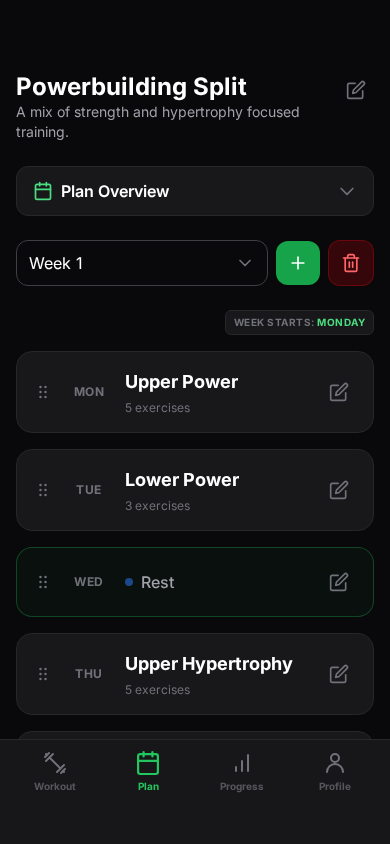
How to move from spreadsheet to app
Step 1
Start from the plan you already use
Bring in the spreadsheet format that already works for your programming, instead of starting from a blank template.
Step 2
Convert it into an app-first plan
IronFlow reshapes the spreadsheet into a workout plan you can navigate by week, day, and exercise.
Step 3
Use analytics and logging instead of manual tracking
Once the plan is inside IronFlow, you can log sessions faster and review progression without living in cells and formulas.
Why spreadsheet users convert
You keep the structure, but drop the friction
Less admin during training
The spreadsheet can stay the source plan, but it no longer has to be the thing you manage mid-workout.
Better day-to-day adherence
A plan that is easier to open, follow, and complete is more likely to be used consistently.
Clearer upgrade path
Spreadsheet users are often serious trainees already. That makes them better candidates for advanced analytics and deeper planning tools.
Workout spreadsheet FAQ
More import paths
Explore the other import guides
Import guide
Import a Google Sheets workout plan into IronFlow
Learn how to move a Google Sheets workout plan into IronFlow so you can keep your structure, log on mobile, and manage the plan on desktop.
Import guide
Turn a workout plan photo into a structured plan
Capture a workout plan from a photo and turn it into a structured IronFlow plan you can log on mobile and manage on desktop.